AI Image and Video Creation
From patient education to practice marketing—visual AI tools that work, how to use them effectively, and the limitations you need to understand.
How can AI-generated images and videos enhance patient education, practice communication, and medical teaching—while avoiding the pitfalls unique to visual content?
Introduction: Why Visual AI Matters in Healthcare
In our previous modules, we explored how large language models process text, the importance of effective prompting, and how clinical decision support tools augment your practice. Now we turn to something that might feel more surprising: the ability to create images and videos from simple text descriptions.
You might reasonably ask, "Why would a physician need to generate images?" The answer spans more territory than you might expect:
- Patient education materials explaining conditions and procedures
- Practice marketing assets—logos, social media graphics, presentation visuals
- Educational content for learners
- Conceptual illustrations for research presentations
- Visual aids during patient conversations
The technology has matured remarkably over the past year. What once produced uncanny, obviously artificial images now generates visuals that can be genuinely useful—sometimes indistinguishable from professional photography or illustration. And video generation, which seemed like science fiction just two years ago, now produces clips that can convey motion, demonstrate concepts, and tell visual stories.
This module covers the leading tools available today, how to use them effectively, and—critically—the limitations and ethical considerations that should guide your use. We'll focus on practical applications relevant to clinical practice and medical education, with hands-on prompt examples you can try immediately.
If you want to start creating AI images and videos today, Google Gemini with Nano Banana is your best starting point. It's free, generates the most accurate text in images (critical for patient education), and now powers video generation through Veo 3.1. Open gemini.google.com and try: "Create a simple diagram showing how an inhaler delivers medication to the lungs, patient education style, with labels pointing to key structures."
For finished materials (flyers, social posts, handouts), pair Gemini with Canva—Canva now integrates Nano Banana Pro directly, so you can generate and design in one place.
New in April 2026: Claude Design (Anthropic Labs) is a collaborative visual-creation tool for designs, prototypes, slides, and one-pagers—an Anthropic-native alternative for clinicians who already work in Claude. It's still early but worth watching alongside Gemini and Canva.
Building on What We've Learned
Before diving into visual AI, let's connect this to the concepts we've established throughout this course.
The Prompting Principles Still Apply
Remember our analogy between AI prompting and taking a patient history? The same principles transfer directly to visual generation. A vague prompt yields vague results. Specificity and context matter enormously.
Consider the parallel:
"The patient has chest pain."
"Make a picture of a heart."
"67-year-old male with sudden-onset substernal chest pressure radiating to left arm, associated diaphoresis, onset 2 hours ago while at rest, history of hypertension and hyperlipidemia, currently on lisinopril and atorvastatin."
"A detailed anatomical cross-section illustration of a human heart showing the coronary arteries, educational medical illustration style, clean white background, labeled structures, suitable for patient education materials, professional medical textbook quality."
The specificity you bring to a prompt directly shapes the quality and usefulness of the output.
Models Are Not Artists—They're Pattern Synthesizers
Just as language models don't "understand" in the human sense, image generators don't "see" or "imagine." They've learned statistical patterns from vast image-text datasets. When you describe something, the model generates pixels that match the patterns associated with your description.
This has practical implications. The models excel at generating images that resemble their training data. They struggle with novel combinations, unusual perspectives, or highly specific technical accuracy. A request for a "cross-section of the brachial plexus" will produce something anatomically plausible but potentially inaccurate in details—much like how a language model might generate confident-sounding but subtly wrong medical information.
Verification Remains Essential
We've emphasized throughout this course that AI outputs require human verification. This applies doubly to visual content, especially anything medical or scientific. An AI-generated anatomical diagram might look convincing while containing errors that could mislead patients or learners. Always review generated visuals with your clinical knowledge, and never use AI-generated medical images as authoritative references for clinical decisions.
The Current Landscape: Major Tools and Their Capabilities
The AI image and video generation space has evolved rapidly. Let's survey the major tools available today, organized by their primary modality.
Image Generation Tools
Google Nano Banana (via Gemini)
Google's Nano Banana—the image generation model powering Gemini—has become the gold standard for AI image creation, particularly for healthcare applications. It went viral in August 2025 when users discovered it could transform selfies into 3D figurines, but its real power is in professional applications: creating patient education materials, infographics, and labeled diagrams with accurate, legible text.
Nano Banana (Fast Mode)
- Character consistency: Maintain consistent characters across multiple images for rich storytelling—useful for patient education series.
- Image blending: Combine multiple images into a single coherent image.
- Natural language editing: Make targeted transformations by describing what you want changed.
- Top-rated editing: Currently the highest-rated image editing model in the world.
Access: In Gemini, select "🍌Create images" from tools and "Fast" from the model menu. Free tier available.
Nano Banana Pro (Thinking Mode)
- Best-in-class text rendering: The best model available for generating images with correctly rendered, legible text—from short taglines to long paragraphs. Essential for infographics, menus, diagrams, and educational materials.
- High resolution: Built-in generation at 1K, 2K, and 4K resolution.
- Multi-person consistency: Upload up to 14 reference images and maintain resemblance of up to 5 people.
- Real-time data: Can use Google Search to verify facts and generate imagery based on current information.
- Platform integrations: Now integrated into Adobe, Figma, and Canva.
Access: In Gemini, select "🍌Create images" and "Thinking" from the model menu. Also available in NotebookLM, Vertex AI, and Google Workspace.
Most AI image generators struggle with text—producing garbled letters or misspellings. Nano Banana Pro solves this, making it ideal for patient education materials where accurate labels and instructions are essential. All images are watermarked with SynthID for AI detection.
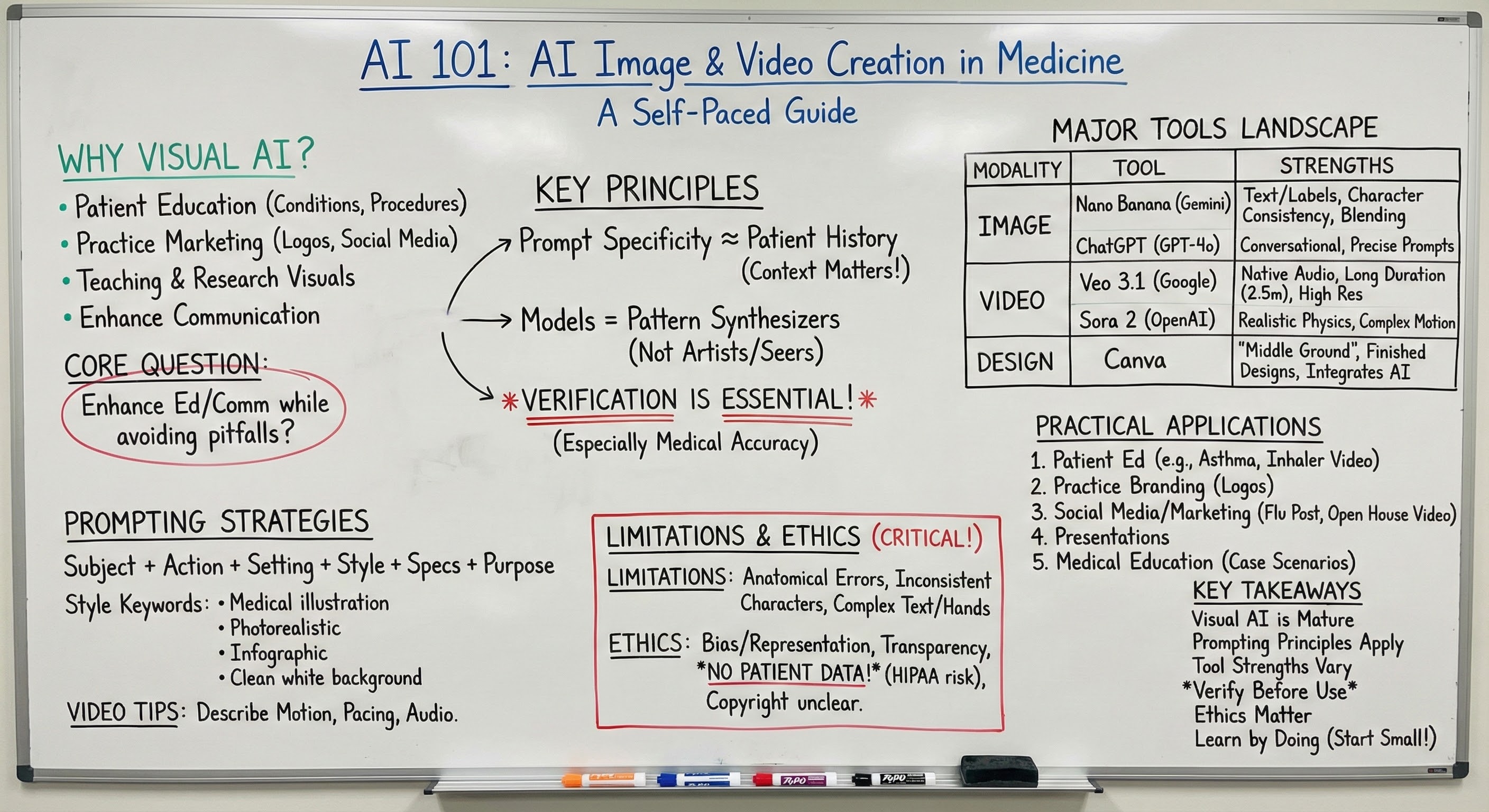
Example: This Module as a Whiteboard Summary
The image below was generated by Nano Banana Pro using a single prompt containing the contents of this web page. It demonstrates the model's ability to render complex text accurately, organize information visually, and produce educational materials ready for use.
ChatGPT Images 2.0
On April 21, 2026, OpenAI released ChatGPT Images 2.0—superseding GPT Image 1.5 and reaching the #1 spot on the Image Arena leaderboard within 12 hours of launch (a +242 point margin over the previous leader). It's OpenAI's response to Google's Nano Banana Pro and the rapid pace of competition in the image space.
ChatGPT Images 2.0 is available on all plans, including Free—a meaningful shift from prior tier-gated rollouts. It improves on GPT Image 1.5's already-strong dense text rendering, adds tighter precise-edit consistency (especially for faces and recurring characters), and produces more natural lighting and material rendering.
Key Capabilities
- Available on all ChatGPT plans: Including Free—no longer gated behind Plus/Pro.
- #1 on Image Arena: Within 12 hours of launch, with a 242-point margin over the previous leader.
- Precise editing with consistency: Edits preserve facial likeness and stylistic continuity across iterations.
- Stronger instruction following: Better at producing exactly what you describe.
- Improved dense text rendering: Useful for diagrams, infographics, and patient education materials.
- More natural results: Better lighting, proportions, and material rendering.
Access: Rolling out to all ChatGPT users including Free. Also available in the API.
New Images Experience
Alongside the model upgrade, OpenAI introduced a dedicated Images experience in the ChatGPT sidebar. This includes preset filters and trending prompts to help you get started quickly, plus the one-time likeness upload feature for consistent self-representation across images.
Video Generation Tools
Google Veo 3.1
Veo 3.1, released October 2025, transformed AI video from an impressive tech demo into a production-ready tool. It generates videos with native audio—from natural conversations to synchronized sound effects—directly from text prompts.
Key Capabilities
- Native synchronized audio: Generate context-appropriate soundscapes, sound effects, dialogue with lip-sync, and even multi-person conversations—all from a single text prompt.
- Extended duration: Generate 4, 6, or 8 seconds from text/images, then extend up to 148 seconds (2.5 minutes!) using Scene Extension. Each extension maintains visual continuity with background audio.
- High resolution: 720p or 1080p output at 24fps.
- Ingredients to Video: Use multiple reference images to control characters, objects, and style—create scenes exactly as you envision them.
- Frames to Video: Provide starting and ending images; Veo generates seamless transitions between them.
- Insert & Remove: Add objects to scenes or delete elements/characters with natural physics.
Access: Available through Google Flow, Gemini API, and Vertex AI. Pricing: $0.15/second (Fast) to $0.40/second (Standard).
Flow is Google's AI filmmaking interface that brings Veo 3.1, Nano Banana, and Gemini together. Use natural language to describe shots, manage story "ingredients" (cast, locations, objects, styles) in one place, and create cinematic sequences. This is where video generation is heading—and it's available now.
OpenAI Sora 2
OpenAI describes Sora 2 as "the GPT-3.5 moment for video"—a major capability jump that makes physically accurate video generation accessible. Released October 2025, it focuses on realistic motion and physics simulation.
Key Capabilities
- Exceptional physics: Handles difficult scenarios like Olympic gymnastics, backflips on paddleboards (modeling buoyancy and rigidity), and accurate ball rebounds. If a basketball player misses, the ball bounces realistically rather than teleporting.
- Synchronized audio: Generates sophisticated dialogue, music, and sound effects matched to video content.
- Cameos: Scan your own likeness and insert yourself into generated videos—useful for personalized patient education content.
- Multi-shot control: Type instructions for camera movement and composition; maintains visual consistency across shot sequences.
- Extended duration: Up to 60 seconds while maintaining quality and coherence.
Access: Included with ChatGPT Plus ($20/month) with limited generations. ChatGPT Pro ($200/month) includes higher limits and resolution. Free tier gets 30 video generations per day. Additional packs of 10 generations available for $4.
Canva: The Accessible Middle Ground
For healthcare professionals who need practical visual design without becoming AI experts, Canva deserves special attention. While Midjourney, ChatGPT, and Veo are primarily AI generation tools, Canva is a comprehensive design platform that has integrated AI features thoughtfully—making it ideal for everyday practice needs.
Magic Studio: Canva's AI Suite
Canva's "Magic Studio" bundles multiple AI capabilities into their familiar drag-and-drop interface:
Magic Design
Describe what you want to create—"a patient education handout about diabetes management"—and Canva generates multiple complete design layouts to choose from.
Magic Media
Text-to-image and text-to-video generation directly within Canva. Generated assets drop right into your design workspace.
Magic Edit
Select any part of an image and describe changes—add objects, change colors, swap backgrounds.
Magic Eraser
Remove unwanted objects from photos with a simple brush selection.
Background Remover
Instantly isolate subjects from backgrounds—useful for creating professional photos or headshots.
Magic Switch
Instantly resize any design for different platforms or translate into different languages.
Why Canva Works for Healthcare
The advantage of Canva over pure AI generation tools is integration with practical workflow. You're not just generating images—you're creating finished materials. Need a vaccination reminder postcard? A waiting room poster about preventive screenings? An Instagram post announcing flu shot availability? Canva provides templates specifically designed for these use cases, and AI features enhance rather than replace this template-based approach.
- Free tier: Basic design tools, 2+ million templates, limited AI features, 5 GB storage.
- Canva Pro: $14.99/month or $120/year. Full Magic Studio access, premium templates, Brand Kit for maintaining consistent visual identity.
- Canva for Teams: $29.99/month for the first 5 users. Collaboration features, shared brand assets, role-based permissions.
Practical Applications for Healthcare
Let's move from tool descriptions to practical applications. Here are specific use cases where visual AI can enhance your practice, with example prompts you can adapt.
Patient Education Materials
Creating clear visual explanations of conditions, procedures, and treatments is perhaps the highest-value application for clinical practice.
Explaining Asthma to Parents
"Picture of lungs with asthma"
"A side-by-side educational illustration comparing normal and asthmatic airways. Left side shows a healthy bronchiole with open airway and thin smooth muscle. Right side shows an asthmatic bronchiole with constricted smooth muscle, thickened airway walls, and excess mucus partially blocking the passage. Clean, simple medical illustration style suitable for patient education. Light blue and coral color palette. Labels pointing to key structures: 'Normal airway,' 'Inflamed airway,' 'Mucus,' 'Constricted muscle.' White background."
Demonstrating Proper Inhaler Technique (Video)
"An educational video showing proper metered-dose inhaler technique. A person shakes the inhaler, exhales fully, places the inhaler at their lips, begins slow inhalation while pressing the canister, continues inhaling for 3-5 seconds, then holds breath with closed mouth. Clean clinical setting, well-lit, shot from the side to show technique clearly. No audio commentary, just ambient sound."
Practice Branding and Logos
Creating a professional visual identity for your practice used to require expensive design agencies. AI tools can generate solid starting points.
Pediatric Practice Logo
"A modern, friendly logo for 'Riverside Pediatrics.' Incorporate a subtle river wave element and a simple, warm representation of a child or family. Color palette: soft teal, coral, and white. Clean vector style, minimalist, would work at small sizes. No text—just the icon/symbol portion of the logo."
Note: Generate the symbol separately from text. AI tools are improving at text, but logos require precise typography—often better handled in Canva or a dedicated design tool where you have exact control over fonts and spacing.
Social Media and Marketing Content
Flu Season Awareness Post
"A warm, inviting image for a social media post promoting flu vaccinations. Show a friendly, diverse family (parents and two children of different ages) in cozy autumn clothing, looking healthy and happy. Soft fall colors in background—golden leaves, warm lighting. Photorealistic style. Leave clear space at top for text overlay. 1080x1080 square format."
Practice Open House Announcement (Video)
"A short welcoming video showing the exterior of a modern medical office building, then transitioning through the front door into a bright, clean waiting room with comfortable seating and friendly natural lighting. Camera moves smoothly in a walking motion. Warm, inviting atmosphere. Morning light. 5 seconds."
Presentation Visuals
Conference Presentation on Childhood Obesity
"An abstract conceptual illustration representing the multifactorial nature of childhood obesity. Interconnected circular elements suggesting: physical activity (motion/movement shapes), nutrition (simple food icons), genetics (DNA helix), environment (home/school building silhouettes), and mental health (brain outline). Professional infographic style, purple and teal gradient color scheme, suitable for a medical presentation slide. Clean white background."
Medical Education Content
Case-Based Learning Scenario Image
"A middle-aged woman sitting in a doctor's office examination room, appearing fatigued and concerned. She's dressed casually, seated on an exam table. Her body language suggests she's describing symptoms—hand gesturing toward her chest area. The physician (visible from behind, wearing white coat) is seated and listening attentively. Professional medical setting, warm but clinical lighting. Realistic style, suitable for a medical education case vignette."
Prompting Strategies for Visual AI
Drawing on our prompting module, here are specific strategies optimized for image and video generation.
The Anatomy of an Effective Image Prompt
Effective prompts typically include several elements:
1. Subject
What is the main focus? Be specific about who or what appears.
2. Action/State
What is happening? Is the subject doing something or in a particular state?
3. Setting/Context
Where is this taking place? What's the environment?
4. Style
What aesthetic are you going for? Photorealistic, illustration, diagram, infographic?
5. Technical Specs
Aspect ratio, resolution, color palette, lighting.
6. Purpose Qualifier
What will this be used for? "Suitable for patient education," "social media post format."
Style Keywords That Work
Certain keywords reliably influence output style:
- "Medical illustration style" or "medical textbook quality" — Clean, educational aesthetic
- "Photorealistic" — Aims for photography-like output
- "Infographic style" — Data visualization, clean graphics
- "Vector illustration" — Clean lines, scalable, logo-appropriate
- "Warm and friendly" — Patient-facing, approachable
- "Professional" or "clinical" — Appropriate for healthcare context
- "Clean white background" — Useful for materials you'll composite later
Iteration and Refinement
Rarely will your first generation be exactly what you need. Build in time for iteration:
- Start broad, then narrow: Your first prompt establishes the general direction. Subsequent prompts refine.
- Identify what's working: When you get a result, note which elements you like before requesting changes.
- Be specific about changes: "Make the background lighter" is better than "I don't like the background."
- Use built-in editing: Most tools now allow selective editing—often faster than regenerating entirely.
Video-Specific Prompting
Video prompts need additional considerations:
- Describe motion explicitly: "Camera slowly pans left," "subject walks toward camera," "gentle zoom in."
- Specify pacing: "Slow, contemplative motion" vs. "quick, dynamic movement."
- Consider audio: If using Veo or Sora with audio, describe the soundscape: "ambient office sounds," "no dialogue, just environmental audio."
- Keep it simple: Current video AI handles single continuous actions better than complex multi-step sequences.
Limitations and Critical Considerations
What These Tools Cannot Reliably Do
Being clear about limitations helps you use these tools appropriately:
- Anatomical accuracy: AI-generated anatomical images may contain errors. Never use them as clinical references or for diagnostic education without expert review.
- Consistent characters: Maintaining the exact same person across multiple images remains challenging. Reference image features help but don't guarantee consistency.
- Complex text: While newer models have improved dramatically, long passages of text still risk errors. Always verify any text in generated images.
- Specific real people: Most tools restrict generation of identifiable real individuals. This is a safety feature, not a bug.
- Complex hands and poses: Though improved, hands remain a weak point. Check carefully when hands are prominent.
- Video complexity: Video AI currently handles simple scenes well but struggles with complex multi-person interactions or rapid action sequences.
Ethical Considerations
AI models reflect biases in their training data. When generating images of people, be intentional about diversity and representation. Don't default to narrow demographics in your prompts.
Transparency about AI origin: Patients and colleagues should know when images are AI-generated, particularly for educational or clinical materials. All major tools now add invisible watermarks, but visible disclosure is also appropriate.
Copyright and commercial use: AI-generated images raise unresolved copyright questions. Most tools grant commercial use rights for images you generate through their platforms. However, the underlying legal framework remains unsettled—multiple lawsuits are ongoing. For high-stakes commercial use, consider consulting with legal counsel.
Never upload patient photos or identifiable information to AI image tools. These platforms are not HIPAA-compliant for patient data processing. Never upload patient-identifiable information—photos, names, medical record numbers, or any combination of information that could identify a patient—to consumer AI tools. If you need to describe a clinical scenario for educational content, use fictional composite cases, not real patients.
Deepfakes and misuse: These same tools that create useful content can generate misinformation. As a healthcare professional, you have particular credibility—be thoughtful about how AI-generated content from your practice could be misused if shared out of context.
Getting Started: Your First Projects
The best way to learn these tools is to use them. Here are concrete starting projects appropriate for different experience levels.
Beginner: Practice Logo Concept
Goal: Generate 3-5 logo concepts for a hypothetical (or your real) practice.
Tool: ChatGPT (free), Gemini, or Midjourney
Steps:
- Write down 3 words that describe the feeling you want your practice to convey (e.g., "warm," "professional," "modern")
- Identify any visual elements relevant to your specialty or location
- Choose 2-3 colors that feel appropriate
- Generate initial concepts using a prompt incorporating these elements
- Iterate on the most promising result with refinement prompts
"A modern, [adjective] logo icon for a [specialty] medical practice. The design should suggest [concept/feeling]. Color palette: [colors]. Clean vector style, minimalist, professional, works at small sizes. No text—icon only."
Intermediate: Patient Education Handout
Goal: Create a one-page patient education handout on a common condition including AI-generated illustrations.
Tools: Image generator of choice + Canva for layout
Steps:
- Choose a condition you frequently explain to patients
- Outline 3-4 key points patients need to understand
- Identify 1-2 concepts that would benefit from visual explanation
- Generate illustrations for those concepts
- Use Canva to combine text and images into a polished handout
- Have a colleague review for clarity and accuracy
Advanced: Short Educational Video
Goal: Create a 15-30 second educational video demonstrating a patient self-care technique.
Tools: Veo or Sora
Steps:
- Choose a simple technique (e.g., nasal saline irrigation, proper splint application, wound care)
- Break the technique into 3-4 distinct steps
- Generate a short clip for each step
- Use a video editor (or Canva) to combine clips and add text overlays
- Review for accuracy—AI may generate incorrect technique
Choosing the Right Tool
With multiple capable options, here's practical guidance on tool selection:
| Use Case | Recommended Tool | Why |
|---|---|---|
| Best starting point | Gemini (Nano Banana) | Free tier, best text accuracy, powers both images and video |
| Images with text/labels | Nano Banana Pro | Best-in-class text rendering for infographics, diagrams, and patient education |
| Aesthetic quality | Nano Banana Pro | High-resolution output (up to 4K) with exceptional detail and style control |
| Complete design projects | Canva (with Nano Banana) | Nano Banana Pro integrated directly into Canva's design platform |
| Video with audio | Google Veo 3.1 | Native audio, 2.5-minute extensions, best overall video tool |
| Realistic video physics | OpenAI Sora 2 | Best for complex motion, liquids, object interactions, sports movements |
| Conversational iteration | ChatGPT (GPT-5.5) | Natural conversation to refine when exploring ideas |
| Patient education handouts | Canva + Nano Banana | Generate labeled illustrations, compose in healthcare templates |
Resources for Further Learning
Official Documentation
YouTube Channels & Video Tutorials
Research & Healthcare Applications
Communities and Prompt Libraries
Key Takeaways
Visual AI Has Matured
The tools available today can genuinely enhance patient education, practice marketing, and educational content creation.
Prompting Principles Transfer
Specificity, context, and clear communication produce better results—just like patient histories.
Each Tool Has Strengths
Nano Banana for text/labels, ChatGPT for conversation, Canva for finished projects, Veo 3.1 for video with audio, Sora 2 for physics.
Verification Is Essential
AI-generated medical content requires expert review before use—especially anatomical or clinical images.
Ethics Matter
Be intentional about representation, transparent about AI origin, and vigilant about patient privacy.
Learn By Doing
Start with a small project and iterate. The technology rewards experimentation.
Visual AI represents another dimension of how artificial intelligence can augment healthcare practice. Like the language models we've discussed throughout this course, these tools work best when humans bring clinical judgment, creativity, and ethical awareness to the collaboration. The images and videos these tools generate are starting points—raw material that you refine, verify, and deploy in service of better patient care and communication.
Learning Objectives
- Identify appropriate use cases for AI image and video generation in healthcare settings
- Construct effective prompts for visual AI tools using specificity and context
- Evaluate the capabilities and limitations of major image and video generation platforms
- Apply verification practices to AI-generated visual content before clinical or educational use
- Navigate ethical considerations including representation, transparency, and patient privacy
- Create practical visual content for patient education, practice marketing, and presentations